How Antivirus Software Actually Works — and How to Choose One
This article is advertising-funded. It recommends a product we hold a commercial affiliate agreement for, and every commercial link on the page is labelled partner link. If you buy after following one, the advertiser pays us a commission — your price is the same either way.
What that does not buy: a rating, a testimonial or a deadline. Read the editorial policy for what we refuse to publish, and the affiliate disclosure for how the money flows.
Most articles about antivirus software describe a product. This one describes a mechanism: what the software is actually doing while it sits in your system tray, which threats that mechanism is good at stopping, and — the part the category rarely admits — where it stops being able to help you at all.
- Signature matching is the oldest and least interesting layer. The work that matters now happens in behavioural monitoring and cloud reputation.
- Read independent lab results (AV-TEST, AV-Comparatives, SE Labs) rather than vendor claims. If a product is not in their current public reports, that absence is itself information.
- On iOS and iPadOS, no app can scan another app’s files. Anything sold as "iPhone antivirus" is a web filter, a VPN or a breach-alert service.
- An offline backup protects you against ransomware in a way no scanner can.
What the threat picture really looks like
It is easy to write a frightening opening paragraph about cybercrime and impossible to source one honestly. Incident counts depend entirely on who is counted, what is defined as an incident, and whether anyone reported it. So rather than quote a number at you, here is where the reliable numbers live and what they broadly agree on.
The European Union Agency for Cybersecurity (ENISA) publishes an annual Threat Landscape report. Verizon publishes the Data Breach Investigations Report from a large pool of real, confirmed incidents. The UK National Cyber Security Centre and the US Cybersecurity and Infrastructure Security Agency both publish advisories and annual reviews. All of these are free, and all of them are more useful than a statistic in an advertisement.
What those sources consistently show is less dramatic and more actionable than the marketing version. The overwhelming majority of successful attacks on individuals and small organisations begin with something ordinary: a stolen or reused password, a convincing message, an unpatched piece of software, or a download from somewhere that looked official. Genuinely novel exploit chains exist, but they are expensive and are generally not spent on home users.
That matters for how you spend money. A security product that is excellent at detecting exotic malware but does nothing about password reuse is solving the rarer problem.
How detection works, layer by layer
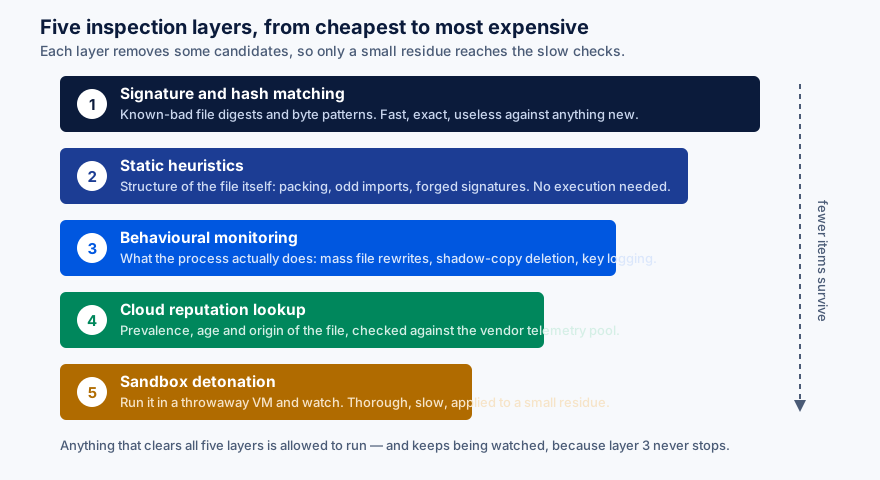
"Antivirus" is a historical name for something that is now a stack of independent checks. A file, a script or a URL is passed down that stack, and each layer is cheaper and blunter than the one below it. Most candidates are resolved in the first microsecond; only a residue reaches the expensive checks.
1. Signature and hash matching
The classic technique: compare a file’s cryptographic digest, or a distinctive run of bytes inside it, against a list of known-bad values. It is exact, it is extremely fast, and it is trivially defeated by changing a single byte. It remains in every product because it costs almost nothing and cleanly resolves the large volume of recycled malware still in circulation.
2. Static heuristics
Here the engine examines the structure of the file without running it. Is the executable packed or obfuscated in a way legitimate software rarely is? Does it import functions typical of keyloggers or process injection? Is the code signature absent, expired, or issued to a certificate holder with no history? None of these is damning alone; together they produce a suspicion score.
3. Behavioural monitoring
This is where a modern product earns its subscription. Instead of asking "what is this file?", the engine asks "what is this process doing?" — and it keeps asking for as long as the process runs. Enumerating every document on every drive, then rewriting them in sequence, is ransomware behaviour whether or not the binary has ever been seen before. Attempting to delete Windows shadow copies is almost never legitimate. Injecting into a browser process to read form fields has a short list of innocent explanations.
Because behavioural rules describe actions rather than files, they catch novel malware. Because they describe actions, they also occasionally catch a badly written backup tool or an unusual installer. That trade-off is the central engineering problem of the field.
4. Cloud reputation
The client asks the vendor’s service what it knows about this file: how many machines have seen it, how long it has existed, where it first appeared. A binary seen on eleven machines worldwide, first observed forty minutes ago, signed by nobody, is suspicious purely on those grounds. This is also the layer with the clearest privacy cost, because it means metadata about files on your machine is sent to the vendor. A vendor’s privacy policy is worth reading for exactly this reason.
5. Sandbox detonation
The last resort: run the sample inside a disposable virtual machine and record what it does. Thorough and slow, so it is reserved for the small number of samples the earlier layers could not settle. Sophisticated malware tries to detect the sandbox and behave itself while inside one, which is why sandboxing supplements the other layers rather than replacing them.
Surfshark Antivirus — real-time scanning plus a VPN in one subscription
Surfshark sells its antivirus inside the Surfshark One bundle, which also includes its VPN. Platform support, the exact contents of the bundle and the price are set by Surfshark and change from time to time — their own product page is the authority, not this one.
Try Surfshark AntivirusPart of the Surfshark One bundle Partner link — opens surfshark.com via our redirect We earn a commission if you buy through this link. It costs you nothing extra and does not change the price you are quoted.How an infection actually unfolds
Knowing the sequence tells you where a defence can intervene, and how much damage is already done by the time it does.
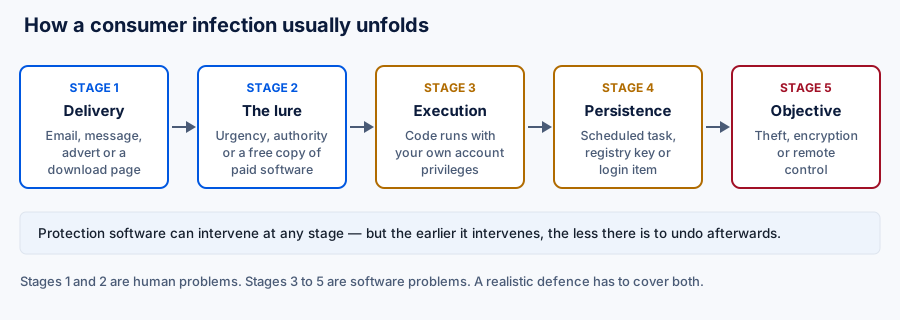
Two details in that chain are worth dwelling on. First, execution happens with your own privileges. Malware that runs as you can read everything you can read. It does not need an administrator password to steal your documents, your browser sessions or your saved passwords — it only needs one to dig deeper into the system.
Second, persistence is the attacker’s weak point. To survive a reboot, something has to be written somewhere durable: a scheduled task, a registry run key, a launch agent, a browser extension. Those locations are small in number and heavily watched, which is why persistence attempts are one of the most reliable behavioural triggers a product has.
Eight things worth checking before you buy
- Independent lab results, current ones. AV-TEST, AV-Comparatives and SE Labs publish comparative results with stated methodology. Check that the product you are considering appears in a recent round, and check the false-positive column as well as the detection column. A product absent from all three public programmes has not been independently measured, which is not the same as being bad — but it is not evidence of being good.
- Behavioural and ransomware-specific protection. Named explicitly in the feature list, not implied by the phrase "advanced AI".
- Web and phishing filtering. Since most attacks start with a link, filtering at the URL stage removes the problem before a file exists.
- The platforms you actually own. See the matrix below; the answer is rarely the same on every operating system.
- What the privacy policy says the vendor collects. Security software has deep access by design. Read what it sends home and how long that is kept.
- Where the company is established and who owns it. Not a moral question — a jurisdictional one about which legal regime governs your data.
- The renewal price, not the first-year price. Introductory pricing in this category is often a fraction of the renewal. The figure that matters is what appears on your card in year two.
- The refund window and how to invoke it. A money-back guarantee that requires a support ticket and a reason is different from one you can trigger yourself.
Platform reality check
This is the part most product pages skip. What a security app can do is capped by the operating system, and no amount of engineering or licence fee raises that cap.
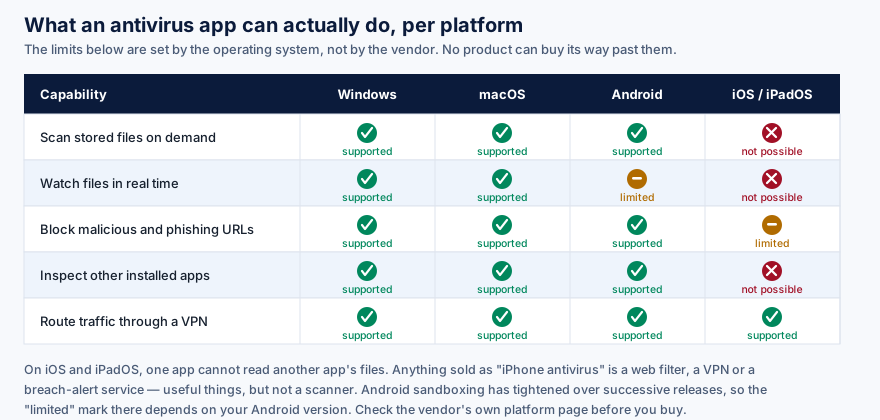
The iOS column deserves to be said in words as well. Apple’s application sandbox prevents any app from reading the files belonging to another app. A traditional file scanner is therefore not merely absent from the App Store — it is architecturally impossible. What vendors legitimately ship for iOS is built on the interfaces Apple does provide: network extensions for VPN and content filtering, and services that check your email address against known breach corpora. Those are worth having. They are not a scanner, and a vendor that implies otherwise is telling you something about itself.
Android sits in between. An app can inspect the packages installed on the device and scan files it has been granted access to. Continuous real-time monitoring of arbitrary file writes is progressively more constrained with each Android release, so "real-time protection" means something narrower there than it does on Windows.
Cover the devices you actually own
Surfshark advertises a single subscription covering an unlimited number of devices, which is unusual in this category and genuinely useful in a household. Which capabilities are available on each of those devices is still governed by the matrix above. Confirm the current platform list and price on Surfshark’s own site.
Check current Surfshark plansPrices and bundle contents set by Surfshark Partner link — opens surfshark.com via our redirect We earn a commission if you buy through this link. It costs you nothing extra and does not change the price you are quoted.Performance: what is reasonable to expect
The complaint that antivirus software slows a machine down is not superstition. Real-time file monitoring means an extra step on file operations, and a full scan is genuinely I/O-intensive. What has changed is the size of the cost on modern hardware.
We are not going to quote you a percentage, because the honest answer is that it depends entirely on the machine, the storage, the workload and the product — and any single figure in an advertisement was measured on hardware that is not yours. AV-TEST and AV-Comparatives both publish dedicated performance tests, with the test rig described, which is the right place to compare.
What is reasonable to expect on a current machine with solid-state storage: no perceptible difference during browsing, video calls or document work; a measurable but tolerable slowdown while a full scan runs; and a noticeable hit when copying very large numbers of small files, which is the worst case for on-access scanning. If a product makes ordinary work feel slow, that is a defect, not a necessary cost of security.
Do not run two real-time scanners at once. They will inspect each other’s activity, fight over file locks and produce exactly the sluggishness the category is blamed for. Pick one and disable the rest. On Windows, installing a third-party product normally stands Microsoft Defender down automatically — verify that it did.
Free versus paid
The free tier question has a better answer than it used to, and it is worth being honest about it on a page funded by a paid product.
Microsoft Defender is built into Windows, is enabled by default, costs nothing, and has scored competitively in independent lab testing for several years. For a careful user on an up-to-date Windows machine it is a reasonable baseline rather than a placeholder. Any argument for paying has to start from that fact.
The arguments that do survive it are these: unified management and consistent protection across Windows, macOS and Android from one subscription; features outside the scanner’s remit, such as a VPN, breach alerting or a password manager, bought together rather than separately; support you can escalate to; and stronger web and phishing filtering than the browser provides on its own. Whether that bundle is worth its renewal price is a judgement about your household, not a universal truth.
The arguments that do not survive it: that free antivirus "does not have real-time protection" (Defender does), or that paying is the only responsible choice. Some free products from ad-funded vendors have historically monetised user data — a real concern, and a reason to read a privacy policy, but not a blanket property of everything that costs nothing.
What antivirus cannot do for you
A short list, because the category is poor at publishing it.
- It cannot un-encrypt your files.
- If ransomware completes, a scanner can remove the program and cannot recover the data. An offline or versioned backup is the only reliable answer. See our ransomware guide.
- It cannot protect a password you gave away.
- Credentials typed into a convincing fake page are simply valid credentials. Two-factor authentication, ideally a passkey or hardware key, is what breaks that chain.
- It cannot patch your software.
- Unpatched browsers, plugins and operating systems remain a leading route in. Automatic updates do more for you than any detection engine.
- It cannot protect data already held by someone else.
- When a service you use is breached, your data leaves through their door. Unique passwords limit the blast radius; nothing on your device prevents it.
- It cannot make a decision for you.
- Every product eventually shows a prompt. Attacks that work are usually the ones that persuade a person to click through the warning.
The product advertised on this page
In the interest of not burying it: this page is funded by an affiliate agreement covering Surfshark Antivirus. Here is what we can state, and what we deliberately will not.
| Point | Our position |
|---|---|
| How it is sold | As a component of the Surfshark One subscription bundle rather than as a standalone antivirus licence. |
| Device count | Surfshark advertises unlimited devices on one subscription. This is a genuine differentiator in a category that usually meters device counts. |
| Platform support | Confirm on Surfshark’s own platform page. Whatever it says, the operating-system limits in the matrix above still apply — no vendor can scan files on iOS. |
| Bundle contents | Surfshark has changed what Surfshark One includes more than once. We are not going to list components we cannot verify on the day you read this. Check the current plan comparison before buying. |
| Independent lab results | Check AV-TEST and AV-Comparatives for the current round. We do not have a certified score to quote you and will not invent one. |
| Refund window | Surfshark advertises a 30-day money-back guarantee. The terms presented to you at checkout are the ones that bind; read them there. |
| Price | Varies by term length, region and promotion. Any figure we printed would be wrong within weeks, so we print none. Note the renewal rate, not only the first term. |
We have no relationship with Surfshark beyond the affiliate agreement. We did not receive a review unit, an interview, an embargoed briefing or any editorial input from them, and they did not see this page before publication.
Make your own comparison
The most useful thing this page can do is send you to the primary source with the right questions in hand: which platforms, what the renewal costs, what the privacy policy says is collected, and whether the product appears in a current independent lab round.
Go to Surfshark AntivirusOpens surfshark.com in a new tab Partner link — opens surfshark.com via our redirect We earn a commission if you buy through this link. It costs you nothing extra and does not change the price you are quoted.Questions we are asked
Is Microsoft Defender enough on its own?
For an attentive user on a fully updated Windows machine, it is a credible baseline — it is enabled by default, includes real-time protection, and has performed competitively in independent lab testing for several years. The case for paying is usually about cross-platform coverage, bundled extras and support rather than about raw detection.
Does an antivirus app work on an iPhone?
Not as a file scanner. Apple’s sandbox prevents any app from reading another app’s files, so no iOS product can scan your device in the way a Windows product does. iOS security apps provide web and content filtering, VPN routing and breach alerts, all of which are useful and none of which is a scanner.
Will it slow my computer down?
There is a real cost, and on current hardware with solid-state storage it is usually imperceptible in ordinary use. It is most noticeable during a full scan and when handling very large numbers of small files. We do not quote a percentage because any single figure depends on hardware we cannot see — AV-TEST and AV-Comparatives publish performance tests with the test rig documented.
Can antivirus recover files that ransomware has already encrypted?
No. It can stop the process and remove the program, but the encryption is done. Recovery comes from a backup that the ransomware could not reach — offline, or versioned with immutable history. Occasionally law enforcement or a researcher releases a decryptor for a specific family; that is luck, not a plan.
Do I need a VPN as well as antivirus?
They solve different problems. A VPN moves the point at which your traffic enters the public internet, which is useful on untrusted networks and against your access provider observing your browsing. It does not stop malware and does not make you anonymous. Buy one because you want that specific property, not because it was in the same box.
Is free antivirus dangerous?
Not inherently. Microsoft Defender is free and good. Some ad-funded free products have historically monetised user browsing data, which is a genuine reason to read the privacy policy of anything you install — paid or not.
How do I check whether a product is any good without trusting the vendor?
Look it up in the current public reports from AV-TEST, AV-Comparatives and SE Labs. Read the false-positive figures as well as the detection figures. Then read the vendor’s privacy policy to see what the product sends home.
Sources and further reading
We link to primary and independent sources rather than to secondary coverage. All of these are freely readable.
- ENISA Threat Landscape — the European Union Agency for Cybersecurity’s annual survey of observed threat activity.
- Verizon Data Breach Investigations Report — annual analysis of confirmed incidents, with its methodology published alongside.
- AV-TEST and AV-Comparatives — independent testing institutes publishing protection, performance and false-positive results with stated methodology.
- SE Labs — independent testing using full attack chains rather than isolated samples.
- UK National Cyber Security Centre and CISA — government guidance and current advisories.
- Apple Network Extension documentation — the interfaces that define what a security app can legitimately do on iOS.
- Have I Been Pwned — free breach-exposure lookup, run by Troy Hunt.
Product facts change without notice. Where anything on this page differs from the advertiser’s own current documentation, pricing page or terms of sale, the advertiser’s own information prevails and ours should be treated as out of date. If you find such a divergence, please tell us — we correct pages in place and record the change.
Written by Isla Ward, Director of publication for BohDo Fast Transport s.r.o.. Published 22 September 2026 and reviewed on the same date. This article is general information about a category of software; it is not security advice tailored to your situation, and it is not a substitute for the vendor’s own documentation. All illustrations on this page are original SVG diagrams produced for savorin.online; no product screenshots or third-party imagery are used. Corrections policy and contact details are in our editorial policy.