Ransomware: What Actually Helps
This article is advertising-funded. It recommends a product we hold a commercial affiliate agreement for, and every commercial link on the page is labelled partner link. If you buy after following one, the advertiser pays us a commission — your price is the same either way.
What that does not buy: a rating, a testimonial or a deadline. Read the editorial policy for what we refuse to publish, and the affiliate disclosure for how the money flows.
Ransomware is the one category where the usual advice inverts. Detection matters, but the thing that determines whether an incident is an afternoon of annoyance or a permanent loss is decided before the attack starts — by whether a copy of your data exists somewhere the attacker could not reach.
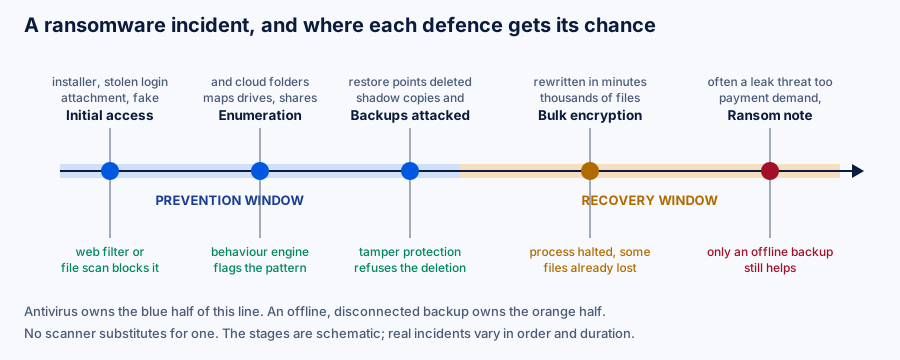
What happens, in order
Initial access. An attachment, a fake installer, a malicious advert, or more often now a stolen or reused credential used to log in legitimately. Nothing exotic is required.
Enumeration. The program maps what it can reach: local drives, attached external disks, network shares, and synchronised cloud folders. This is the moment a behavioural engine has its cleanest signal, because mass enumeration followed by mass writes is a very specific pattern.
Backups attacked. Before encrypting anything, competent ransomware deletes Volume Shadow Copies, disables recovery, and looks for backup files to destroy. The attacker knows as well as you do what determines whether you pay. Windows tamper protection and behaviour rules that specifically watch for shadow-copy deletion exist because of this step.
Encryption. Files are rewritten, usually in a prioritised order that starts with documents and images. On a modern machine this is fast. A process halted midway leaves you with a partially encrypted set, which is better than the alternative and still a real loss.
The demand. Increasingly accompanied by a threat to publish data the attacker copied out first — so-called double extortion, which means that restoring from backup solves the availability problem but not the confidentiality one.
The backup rule that actually matters
The traditional formulation is 3-2-1: three copies of your data, on two different kinds of media, with one copy off-site. It predates ransomware and needs one addition to survive it.
At least one copy must be unreachable from the machine being protected — physically disconnected, or held on a service with immutable versioning that your own credentials cannot delete. A permanently connected external drive is not a backup against ransomware. It is another drive to encrypt.
Two practical notes that catch people out:
- Cloud sync is not backup. If a file is encrypted locally, the sync client faithfully replicates the encrypted version. What saves you is the provider’s version history — check how far back it goes and whether you can restore a whole folder at once, before you need to.
- An untested backup is a hypothesis. Restore something from it. The failure modes — a corrupt archive, a forgotten passphrase, a job that silently stopped months ago — are only discovered by trying.
Detection is the other half
A behavioural engine is what gives you a chance of stopping an encryption run in progress. Surfshark Antivirus is sold within the Surfshark One bundle; we hold a paid affiliate agreement with the advertiser. It complements a backup and does not replace one — nothing does.
See Surfshark AntivirusOpens in a new tab Partner link — opens surfshark.com via our redirect We earn a commission if you buy through this link. It costs you nothing extra and does not change the price you are quoted.Reducing the chance it starts
- Patch promptly. Automatic updates for the operating system, the browser and anything internet-facing. This does more than any product you can buy.
- Unique passwords plus two-factor authentication on email above all, since email is the reset mechanism for everything else. See our passwords guide.
- Do not work as an administrator. A standard account limits what a successful infection can reach without a further step.
- Turn on controlled folder access if you run Windows. It restricts which applications may write to your documents, and it is built in and free.
- Treat macro-enabled documents as executables. Because that is what they are.
- Close what you do not use. Remote desktop exposed to the internet is a recurring root cause in real incident reports.
If it happens
- Disconnect the machine from the network and from any external drive. Immediately. Unplug the cable or turn off the adapter.
- Do not reboot or wipe before deciding. Some families leave key material in memory, and evidence on disk may matter later.
- Photograph the ransom note. The family name in it determines whether a free decryptor exists.
- Check No More Ransom, the joint Europol and industry project that publishes free decryption tools for families whose keys have been recovered.
- Report it. To your national cybercrime authority, and — if personal data of others was affected — to your data protection authority within 72 hours, as Article 33 GDPR requires.
- Restore from a clean backup onto a rebuilt system. Restoring onto a machine that may still carry persistence is how people get encrypted twice.
Law enforcement across the EU advises against paying. Beyond funding the operation, payment is not a guarantee: decryptors supplied by attackers are frequently slow, incomplete or broken, and in the double-extortion pattern a payment buys a promise to delete data that you have no way to verify. Payment may also raise sanctions questions depending on who is behind the attack. If you are facing this decision in a business, it is a matter for legal advice, not for an article.
Sources
- No More Ransom — free decryptors, run by Europol with industry partners.
- NCSC ransomware guidance — UK National Cyber Security Centre.
- CISA StopRansomware — US guidance and the joint ransomware guide.
- ENISA Threat Landscape — observed trends in the EU.
- Microsoft: controlled folder access — documentation for the built-in Windows feature.
Product behaviour changes without notice. Where anything here differs from a vendor’s own current documentation or terms, the vendor’s information prevails. Tell us about any divergence at info@savorin.online and we will correct the page.
Written by Isla Ward, Director of publication for BohDo Fast Transport s.r.o.. Published and last reviewed 22 September 2026. General information, not security advice tailored to your circumstances. All diagrams on this page are original SVG files produced for savorin.online. Editorial policy and corrections procedure.