Phishing and Social Engineering: Six Signals Worth Checking
This article is advertising-funded. It recommends a product we hold a commercial affiliate agreement for, and every commercial link on the page is labelled partner link. If you buy after following one, the advertiser pays us a commission — your price is the same either way.
What that does not buy: a rating, a testimonial or a deadline. Read the editorial policy for what we refuse to publish, and the affiliate disclosure for how the money flows.
Phishing survives because it does not attack software. It attacks the very reasonable habit of doing what a message from your bank appears to ask. The defence is not cleverness — competent people are phished daily — it is a short checking routine applied before the part of you that wants to be helpful takes over.
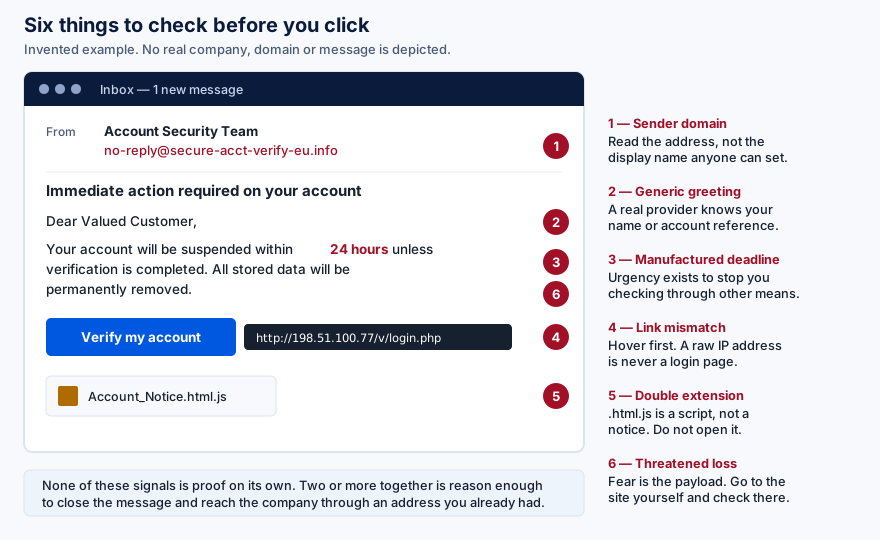
The six signals
1. The sending domain, not the display name
Anyone can set a display name to anything. The part that is hard to fake is the domain after the @. Expand the header and read it. Watch for lookalike domains: a hyphen inserted, an extra word, an unfamiliar top-level domain, a character from another alphabet that renders like a Latin one. On a phone this takes two taps and is the single highest-value check available.
2. A greeting that fits anybody
An organisation that holds an account for you normally knows your name or your account reference. "Dear Valued Customer" is a message written once and sent to a list. This is weak evidence on its own — genuine bulk mail is impersonal too — but combined with anything else on this list it is meaningful.
3. A deadline that exists to stop you thinking
Twenty-four hours. Immediate suspension. Final notice. Manufactured urgency is not a stylistic flourish; it is the functional core of the attack, because checking through another channel takes time and the attacker needs you not to take it. Real organisations do occasionally impose deadlines, and they do not mind you calling them to confirm.
4. A link whose destination is not what the text says
Hover over it on a desktop; press and hold on a phone. Read the destination before you commit. A bare IP address is never a login page for a real service. A URL where the brand name appears as a subdomain of something else — yourbank.security-check.example.com — belongs to whoever owns the final two labels, and that is not your bank.
5. An attachment that does not fit the errand
A delivery notice does not need a macro-enabled spreadsheet. An invoice does not need a script file. Be especially wary of double extensions such as Notice.html.js: on a system configured to hide known file types, the visible name is a lie about what the file is. Archives, especially password-protected ones, exist in these messages to defeat scanning.
6. A consequence designed to frighten you
Account closure, data deletion, a police matter, a payment you do not recognise. Fear is the payload. The countermeasure is procedural rather than emotional: never act inside the message. Open a new tab, type the address you already knew, and look for the same alarming thing there. If it is real, it will be waiting for you.
No single item on this list proves fraud. Legitimate mail is sometimes impersonal, urgent or oddly formatted. Two or more together is enough to stop and verify through a channel you chose yourself.
Filtering catches some of this before you see it
Web and URL filtering blocks known phishing destinations at the moment of the click, which removes the decision from you entirely for messages that are already catalogued. It cannot catch a domain registered an hour ago. Surfshark Antivirus is sold within the Surfshark One bundle; we hold a paid affiliate agreement with the advertiser.
See Surfshark AntivirusOpens in a new tab Partner link — opens surfshark.com via our redirect We earn a commission if you buy through this link. It costs you nothing extra and does not change the price you are quoted.Beyond email
The same mechanics arrive by other routes, and the checking routine transfers unchanged.
- SMS and messaging apps
- Shortened links, no headers to inspect, and a screen small enough to hide a destination. Delivery-notification and bank-alert pretexts dominate because almost everyone is expecting one of those.
- Telephone calls
- Caller ID can be forged. The rule that works: nobody legitimate ever needs your password, your one-time code or remote access to your computer. End the call and dial the number printed on your card or statement, never one the caller gave you.
- Search results and advertisements
- Paid placements for common searches — software downloads, support numbers, cryptocurrency services — are a recurring route to convincing fakes. Prefer the known address over the first result.
- Multi-factor fatigue
- An attacker with your password triggers approval prompts repeatedly until you tap Approve to make it stop. Never approve a prompt you did not initiate; treat one as notice that your password is already compromised.
- Invoice and payment redirection
- The version that costs businesses the most. A supplier’s bank details change by email, mid-thread, in perfect context. Verify any change of payment details by telephone on a number you already held.
If you already clicked
This happens to careful people. Speed matters more than self-reproach.
- If you entered a password, change it now — on the real site, and everywhere else you reused it. Reuse is what turns one mistake into several.
- Revoke active sessions in the account’s security settings. Changing a password does not always sign an attacker out.
- Check for changes you did not make: forwarding rules and filters on your email, added recovery addresses or phone numbers, new authorised devices or app passwords. Mailbox rules that hide the attacker’s own messages are a standard post-compromise step.
- If you ran a file, disconnect and scan from the network, then run a full scan. If anything is found, assume credentials stored on that machine are compromised and change them from a different device.
- Tell whoever needs to know. Your bank if payment details were involved; your employer if it reached a work account. Reporting early is not an admission of carelessness, it is what limits the damage.
- Report the message. Most mail providers have a report-phishing button, and it improves filtering for everyone.
The structural fix
Everything above is mitigation. The one change that removes the attack rather than reducing it is a login credential that cannot be handed over.
Passkeys and hardware security keys are bound to the real site’s domain by the browser. Presented with a convincing replica on a different domain, they simply do not offer to authenticate — not because the user noticed, but because the cryptography has nowhere to go. One-time codes from an app are a real improvement over SMS and are still phishable, because a code can be read aloud or typed into a fake page. Where an account you care about offers a passkey, that is the upgrade worth making.
Sources
- NCSC phishing guidance — UK National Cyber Security Centre.
- CISA: recognise and report phishing.
- Verizon Data Breach Investigations Report — the standing evidence base on how intrusions actually begin.
- FIDO Alliance on passkeys — how domain binding removes the phishing step.
- Have I Been Pwned — check whether an address of yours appears in a known breach.
Product behaviour changes without notice. Where anything here differs from a vendor’s own current documentation or terms, the vendor’s information prevails. Tell us about any divergence at info@savorin.online and we will correct the page.
Written by Isla Ward, Director of publication for BohDo Fast Transport s.r.o.. Published and last reviewed 22 September 2026. General information, not security advice tailored to your circumstances. All diagrams on this page are original SVG files produced for savorin.online. The email depicted in the illustration is invented; no real company, domain or message is shown. Editorial policy and corrections procedure.